

For teams running coding agents
Designed for teams that run coding agents, built so the one that needs someone gets an answer — from any device.
Agentower puts every coding agent your team runs — Claude Code, Codex and Cursor — on one board. The ones that need someone go on top, every card says what its agent is doing, and every turn keeps a record of what it actually changed.
14-day free trial (card required, cancel any time before it ends) · Solo $5 a month + VAT · $12 a seat a month + VAT for teams · Metadata only by default — never your code
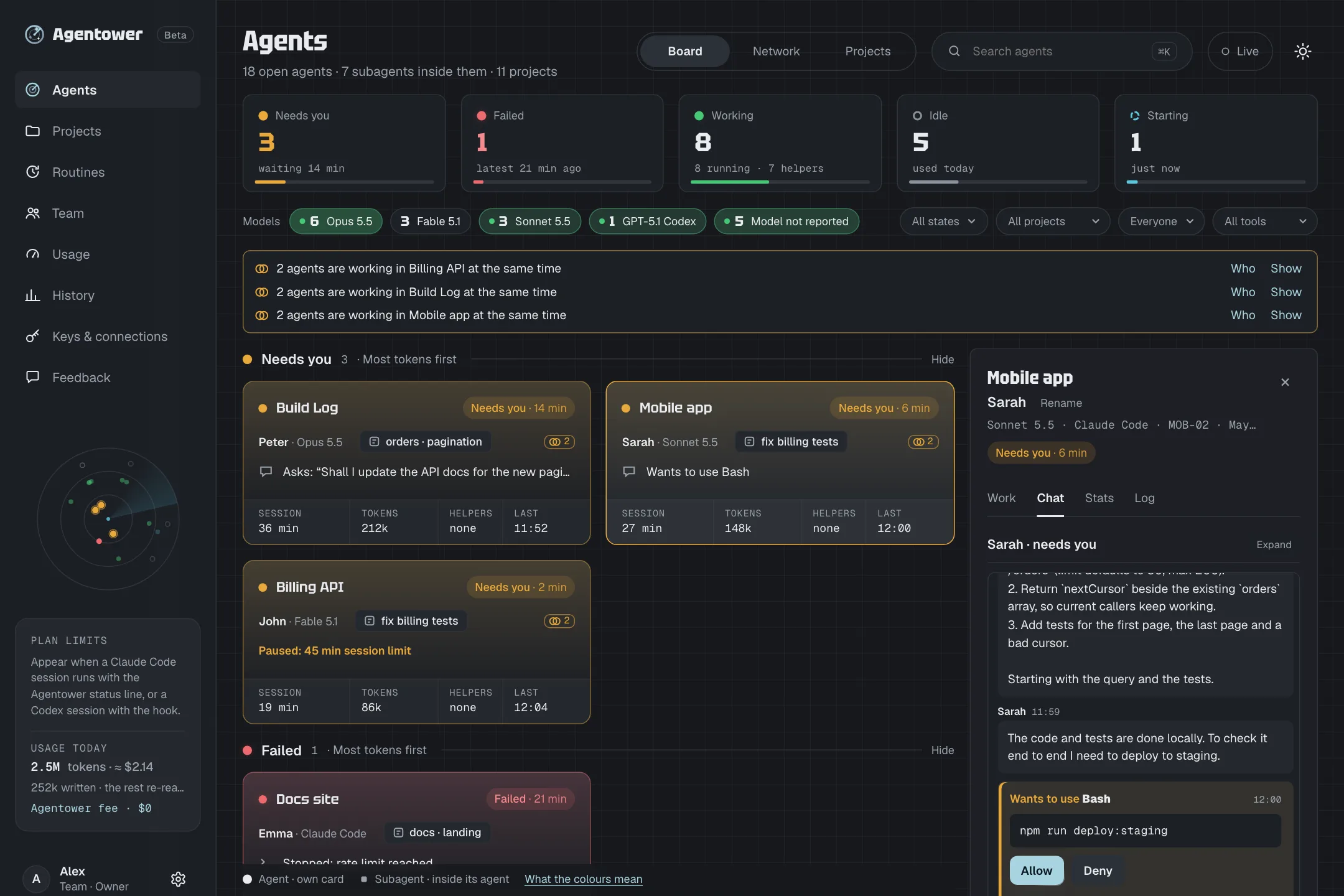
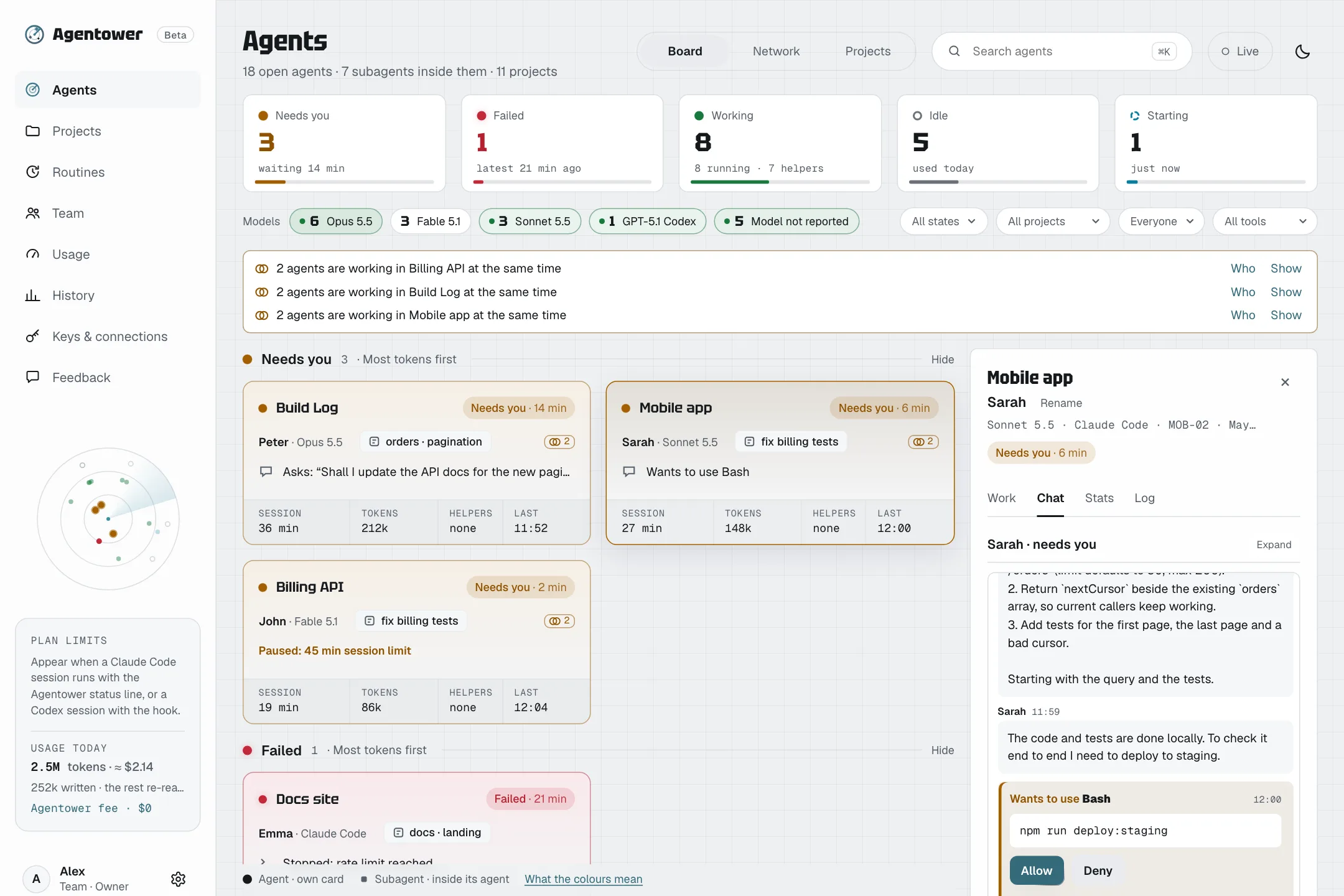
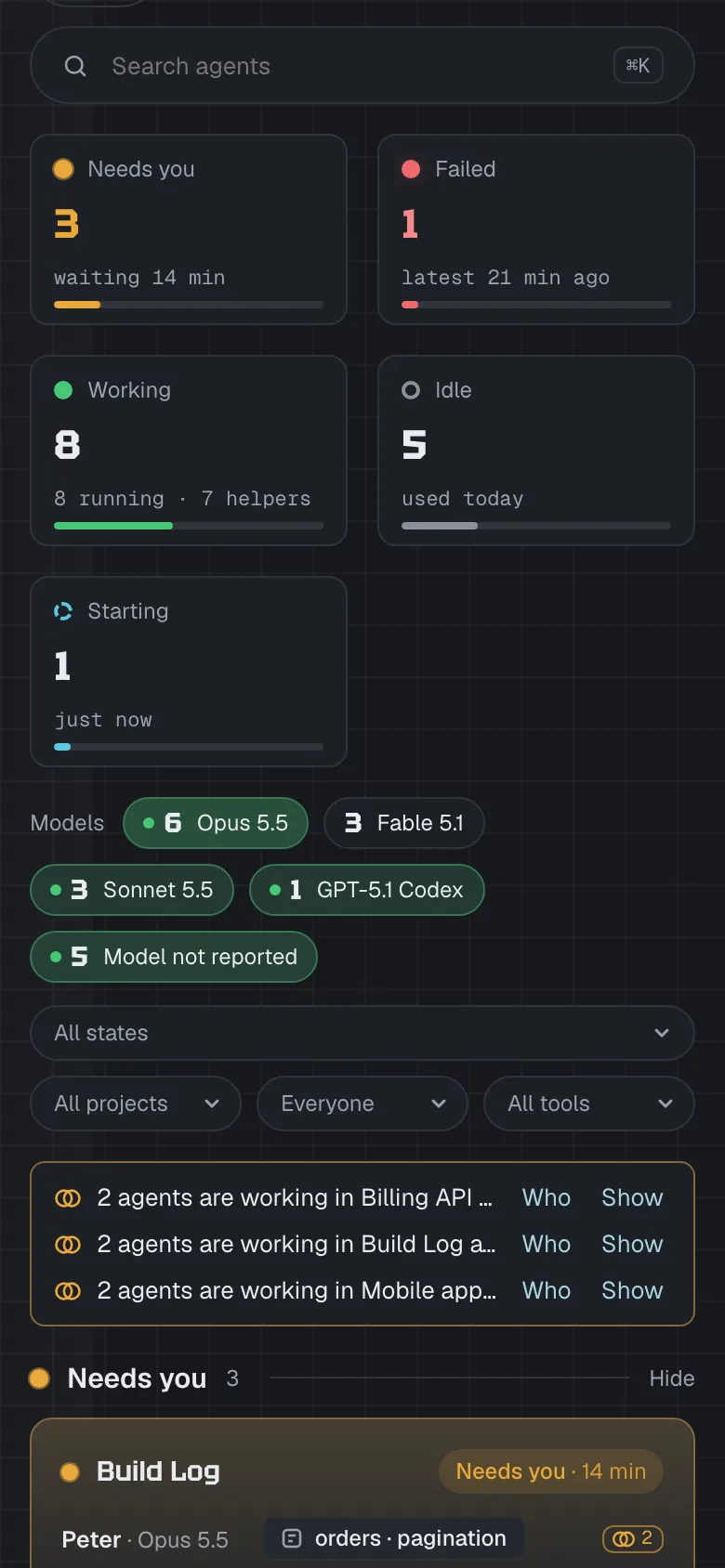
The real app, with sample projects and people.
Who needs someone
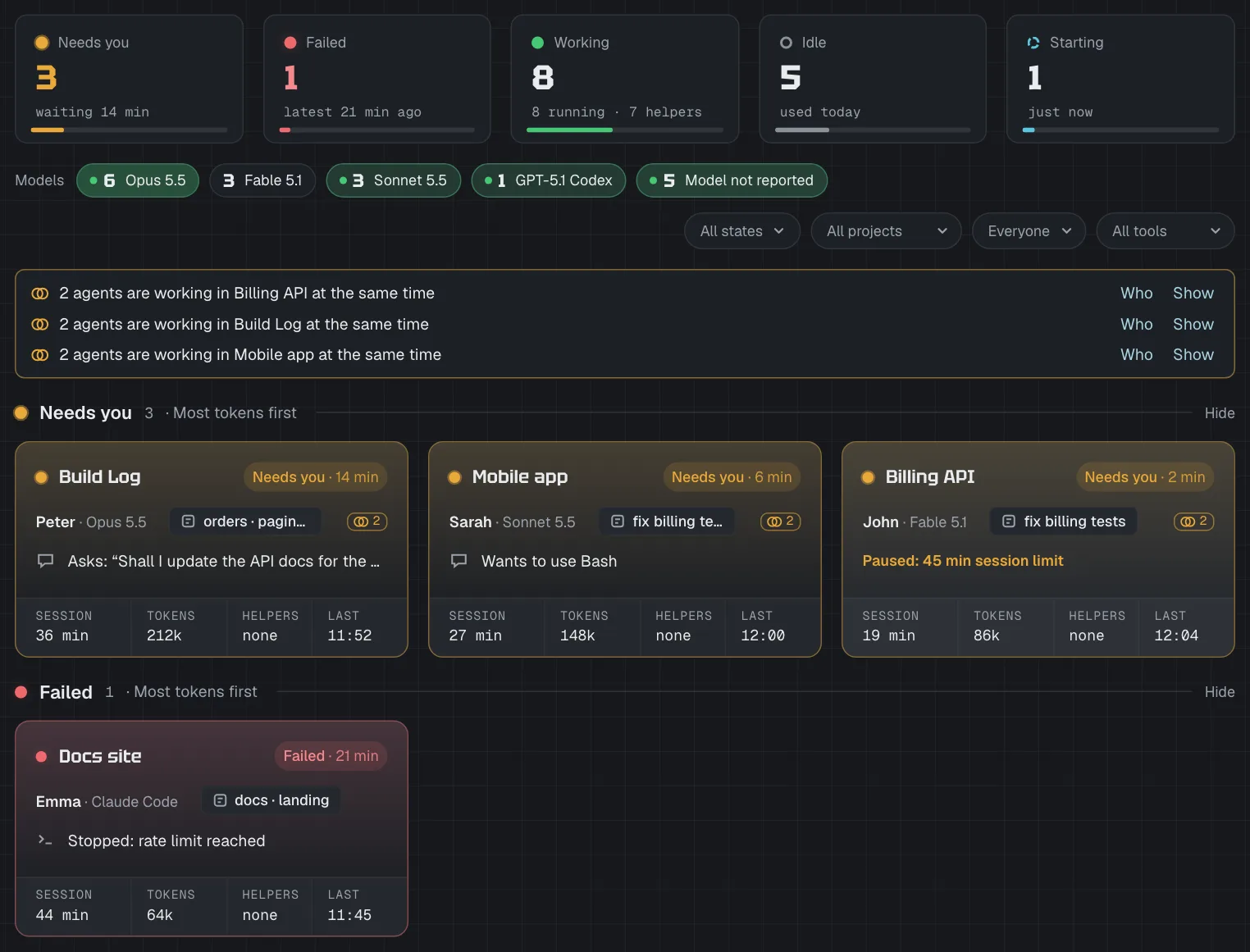
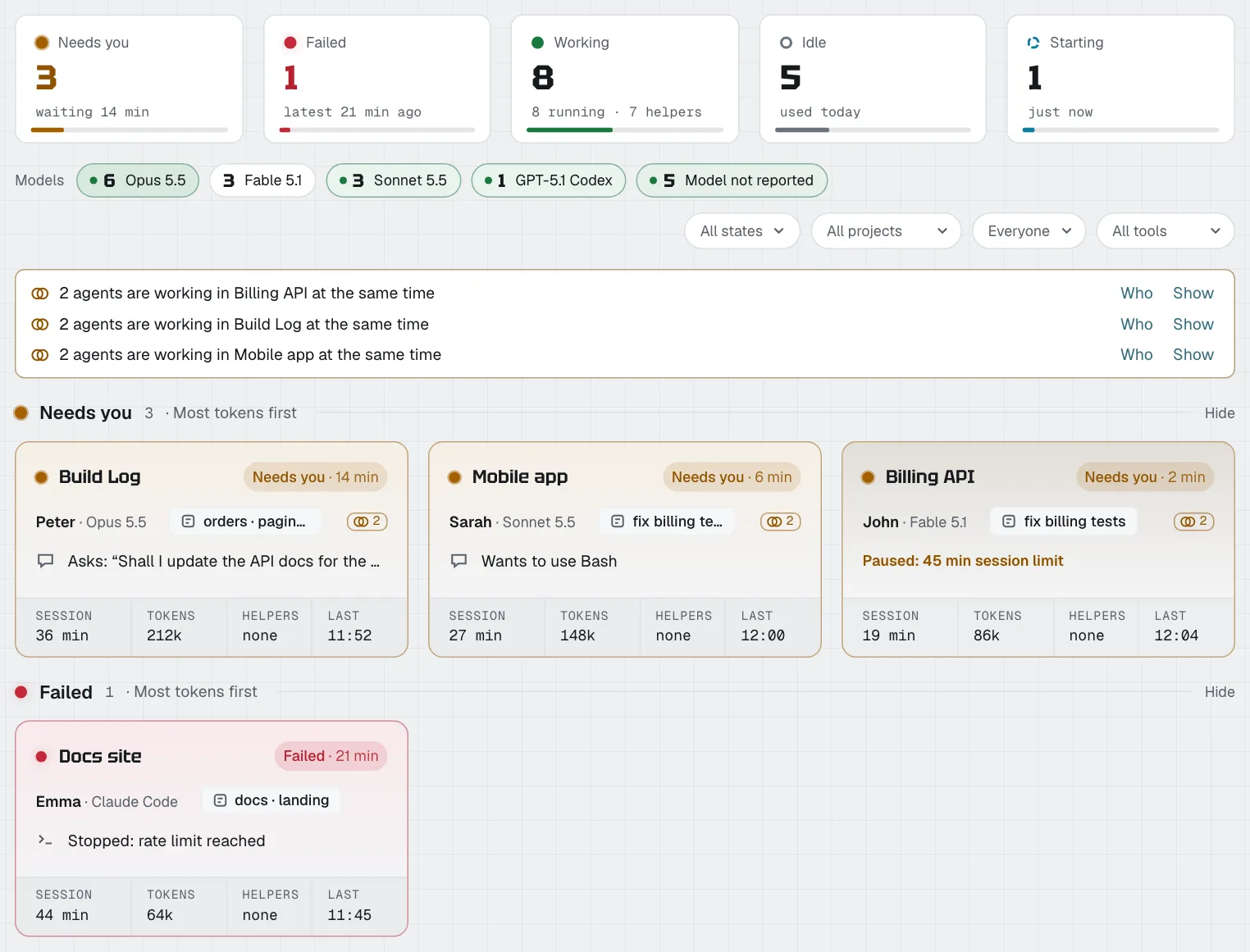
Agents waiting on a person go to the top — with what they’re waiting for.
What each one is doing
Every card says it in a few words: running tests, editing four files, deploying to staging.
What it actually did
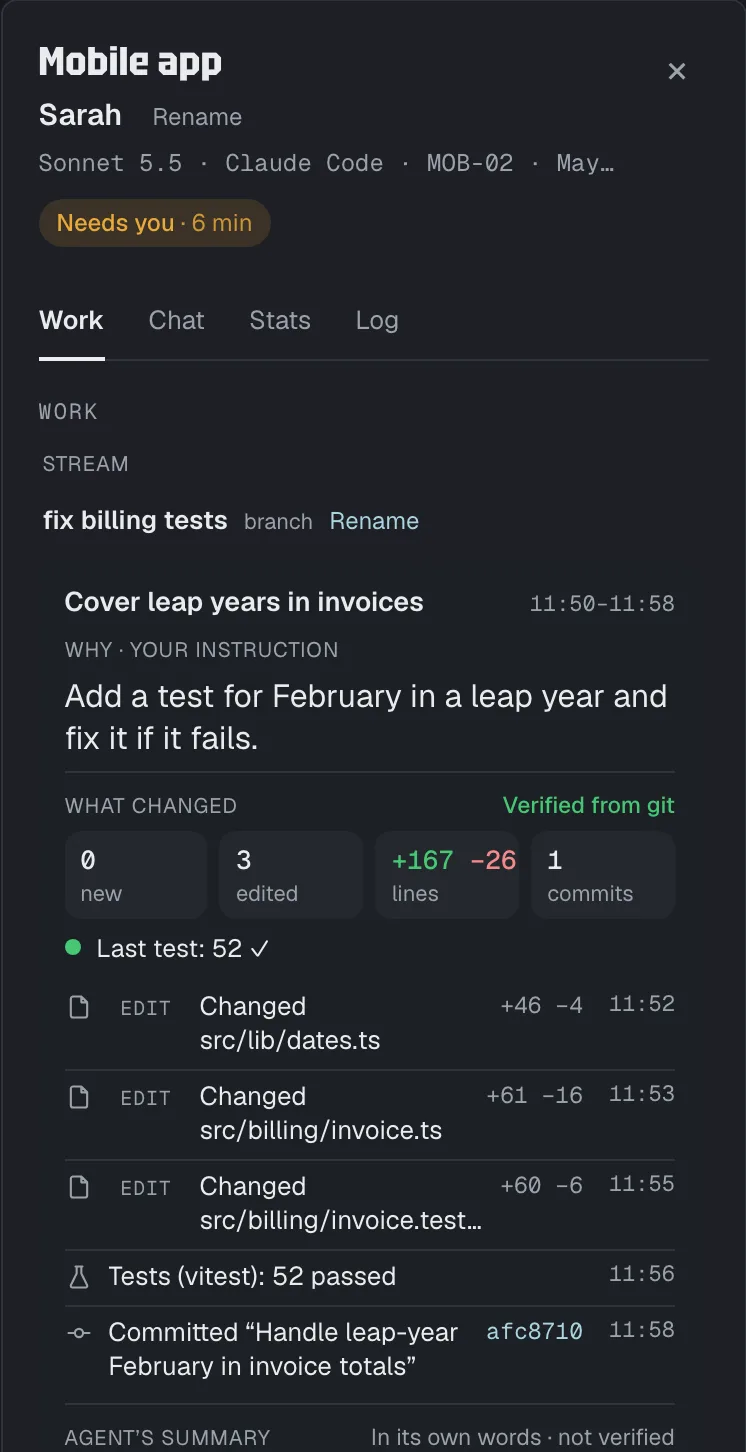
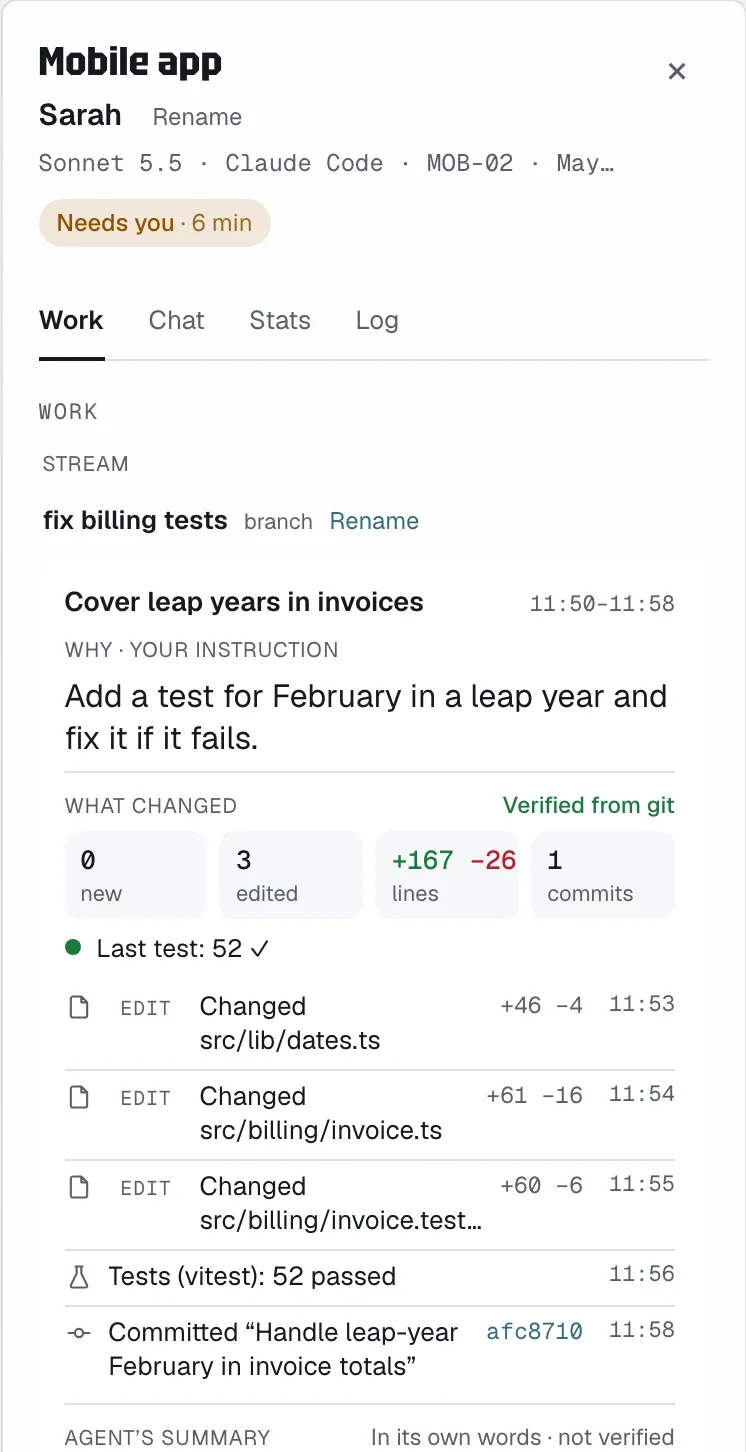
Files, lines, tests, commits and pushes for every turn — checked against git, not taken on trust.
Right now
Know what every agent is doing
No more “Running a command”. Each card says what its agent is doing in plain words — running tests, editing four files in src, deploying to staging, or asking a question you can read in full. When an agent’s turn is over but a helper it started is still busy, the card says Background instead of pretending it’s done.
What each agent did
See what every agent actually did
With several agents running, writing the code is no longer the hard part — keeping track of what they produced is. Open any agent’s Work tab: what it was asked, the files it created and edited and how many lines, the tests it ran and whether they passed, its commits and the branch it pushed — each commit one click from GitHub or GitLab. The agent’s own summary sits apart, marked “not verified”.
Counts and branch names always; file names, commit messages, failed tests, and each turn’s instruction and the agent’s summary only for projects where you switch on Work details. The work record never includes your code, diffs or full commands.
Needs you first
The agent that’s stuck comes first
Agents waiting on a person sit at the top in amber, with what they’re waiting for: a permission, a question or a plan to review. Failed agents follow in red. Working and idle agents stay calm below, so one look tells you who is stuck. Finished with an agent the board still shows as working or failed? Move it to Idle, or set it aside as Inactive — its next real step brings it back. Your team hears about it in Slack, Teams, Google Chat, Discord or by email.
From any device
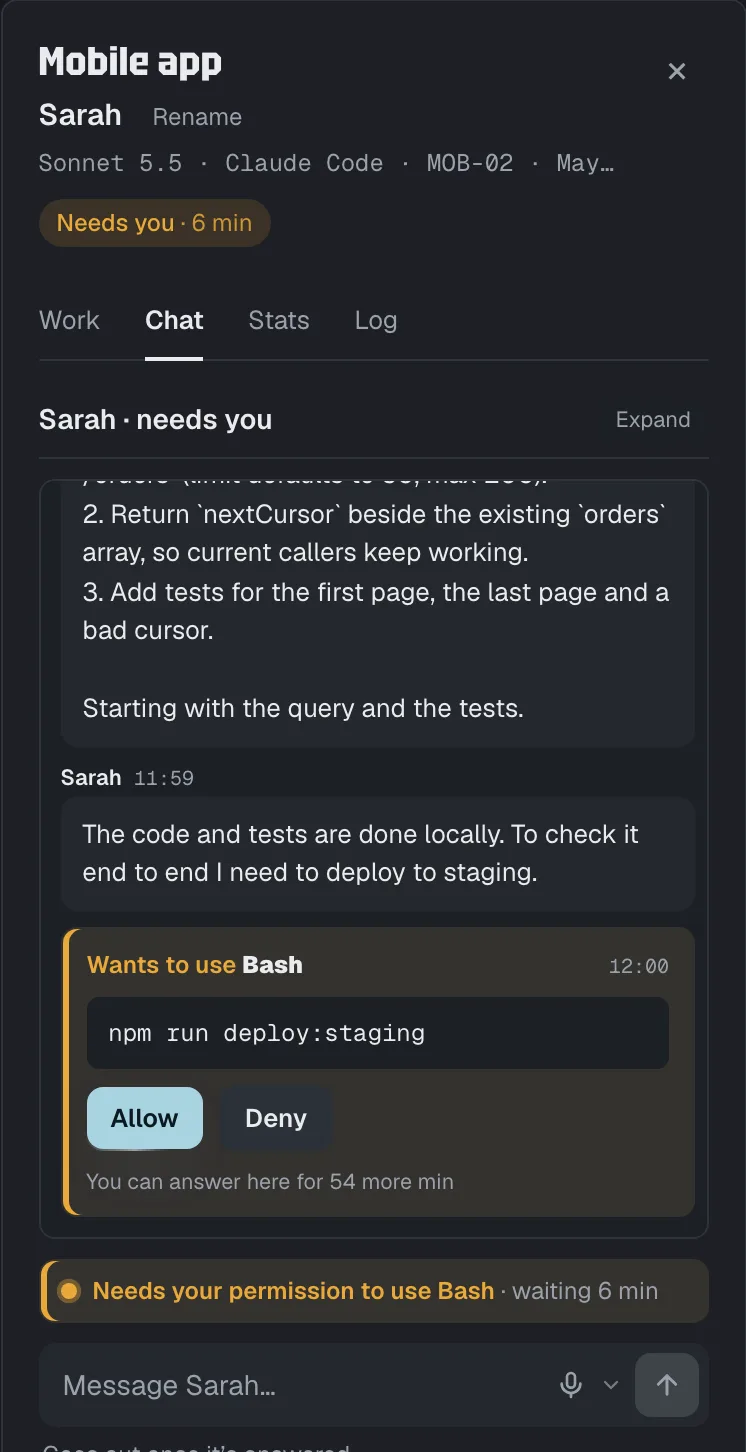
Answer from the browser or your phone
Allow or deny a permission, answer a question, or message an agent — “run the tests” — whether it’s idle or still working. The terminal keeps working too: whichever answer comes first wins, and a request stays open for up to an hour. Answering is off until a workspace owner switches on “Agent chats” and the developer turns on “Remote answers” on their own computer.
The week
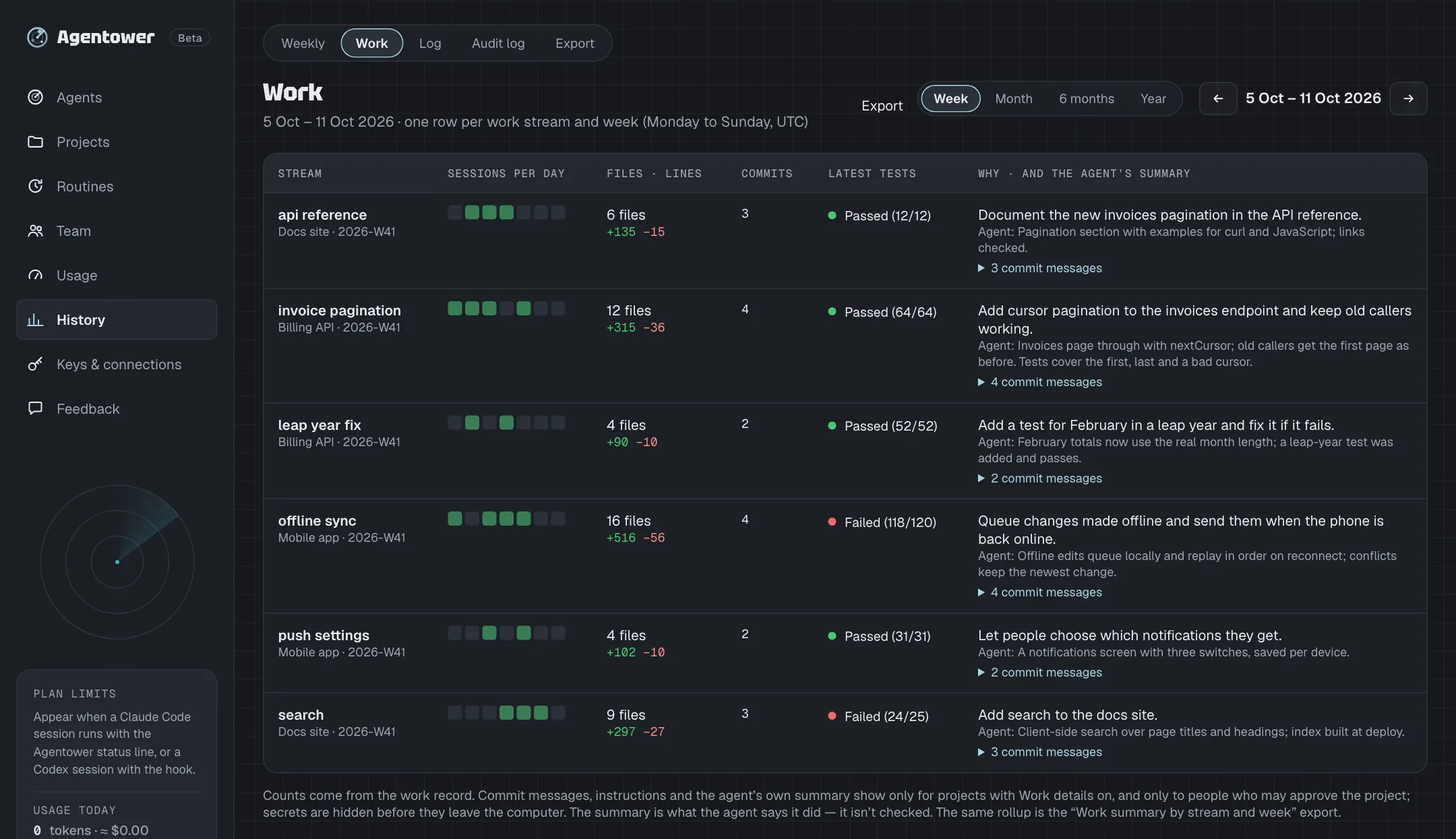
A week of agent work, by stream
History → Work rolls each week up by work stream — the branch, worktree or label each piece of work happened in: the sessions per day, files and lines, commits, the latest test result, and why it was done. The Weekly view adds agent hours and approximate cost per person and per project — sort any column, filter by name, download it as CSV — and it comes by email on Monday morning for anyone who wants it.
How it works
- 1
Connect
Create a key, then paste one command on each developer’s Mac or Linux machine to connect Claude Code — your empty board walks you through it. Codex and Cursor have their own short setup on the Keys page. It adds small hooks that report status and token usage — by default never your prompts, and never your code.
- 2
See
Every agent appears on one board, live. The ones waiting on someone go to the top, with what they’re waiting for.
- 3
Answer
Allow or deny from the browser or a phone — or message an agent, say “run the tests”, whether it’s idle or still working. The terminal keeps working too: whichever answer comes first wins.
Built for teams
When five developers each run a few agents, someone is always waiting on someone. Agentower makes sure the right person hears about it.
One board for the team
Everyone’s agents in one place, filtered by person, project or tool — hide any state you don’t need, or switch to the Network view: people, their projects and their agents, joined up. No more asking round who’s stuck. If two agents are busy in the same project at once, the board flags it — and names the file when both ask to edit it.
Roles and approvers
Owners, approvers and viewers across the workspace — and, per project, the named people who may approve.
Guardrails
Limits on session time, tokens and cost, or daily cost — for the workspace, a project or a person. A warning at 80 %; at 100 % the agent pauses until someone approves.
Where your team already talks
Slack, Microsoft Teams, Google Chat, Discord, email or your own webhook — when an agent needs someone, fails or hits a guardrail. A webhook can also get live counts, for an “agents working now” number on your own site.
A weekly summary
Agent hours and approximate cost per person and per project: sort any column, filter by name and download it as CSV — and, for anyone who opts in, get it by email on Monday morning.
An audit log
Who allowed, denied or messaged an agent, moved it to Idle, changed a guardrail or downloaded data, and when. It records the action, never the message text or the command.
Invite teammates with a link or by email. Sign in with email or Google — no passwords.
Which tools work
What each tool lets Agentower do today. Where a tool doesn’t report something, we say so rather than guess.
| Feature | Claude Code | Codex | Cursor |
|---|---|---|---|
| Status on the board | Yes | Yes | Yes |
| Shows when it needs someone | Yes | Yes | No — Cursor doesn’t report it |
| Allow or deny from Agentower | Yes | Yes | No |
| Message it from Agentower | Yes | No — not yet | No |
| Pauses at a guardrail | Yes | Yes | Partly — time limits only |
| Token and cost use | Yes | Partly — tokens, no cost | No |
Cursor reports status — working, idle, finished or failed — and can be paused by a time limit, but it can’t tell Agentower when it’s waiting for someone. Other tools, your own agents and scripts can report status with our TypeScript and Python SDKs, the REST API or the MCP server.
Metadata only
Agentower needs to know that an agent is waiting, not what it’s working on.
What’s sent
- The project folder’s name — not its path
- Session and agent IDs, the kind of event (started, working, needs someone, finished), and whether background work is still running — never what it runs
- The name of the tool an agent is using, such as Bash or Edit, and the AI model it runs on
- The tool’s own short notice, such as “needs your permission”, and error types
- Token counts and cost estimates, from the tool’s own usage telemetry
- Plan-limit numbers (percent used and reset time), if you use them
- What each agent did, as counts: files changed, lines added and removed, tests passed or failed, commits (with their short ID), pushes and pull requests — and the repo’s host and name, so a commit can link there
- Names that tell its work apart: the branch, the worktree folder, a launch label you set and the top folder of the files it edits — never full paths
- Before each step, its kind (tests, build, deploy…) and the program’s name — never a script’s file name — and, for a deploy, a standard environment name such as staging
- Your computer’s random ID, its operating system type and the hook’s version
Claude Code’s telemetry always includes the signed-in email. Agentower reads only the usage numbers and never stores it.
What’s never sent
- Your prompts — unless a project switches on Work details, which keeps each turn’s opening instruction (600 characters, secrets hidden)
- File contents or command output
- Full file paths on your machines
Keys are stored only as hashes; notification addresses are encrypted. The audit log records actions, never message text.
By default that’s all — plus, for projects where you switch on Work details, file names, commit messages, failed tests and each turn’s instruction and summary. One setting, “Agent chats”, off until an owner turns it on, sends more: an agent’s question (one sentence, code removed); its chat (its replies, which can include code it shows, and its questions — kept only until the session ends, never in the main database); and answering from Agentower (the tool name and a short detail such as the command, deleted once answered).
Pricing
Start with a 14-day free trial (card required, cancel any time before it ends), or — during the beta, while one of 5 places is open — 6 months of Solo free. Then $5 a month + VAT for one person, or $12 a seat + VAT for teams. No fee on tokens — your agents run on the plans you already pay for.
Solo
- 14-day free trial, card required — or 6 months free with one of 5 beta places
- Live agents board
- Allow, deny and message agents from the app
- Claude plan limits, live
- API and MCP: 1,000 calls a month
- 7 days of history
Team
- Everything in Solo, for the whole team
- Team board, filter by person
- Roles and approvers per project
- Guardrails: warn at 80 %, pause at 100 %
- Slack, Teams, Google Chat, Discord, email, webhook
- Weekly summary · audit log
- Agent actions API: act on agents from scripts or CI
- API and MCP: 25,000 calls a month, then from $0.004 per call
- Google sign-in
- 1 year of history
Enterprise
- Everything in Team
- 250,000 API calls and 5,000 insights a month included, then Team's per-call prices
- A data processing agreement (DPA), on request
- Priority support
- Safety cap $250 a month per product, which you can raise yourself
- SAML single sign-on
- User provisioning (SCIM)
- Custom data retention
VAT is added at checkout by Stripe, which sells the subscription as seller of record. Agentower is in beta: features may change, and we’d love your feedback.
API calls
Reporting your agents is always free — hooks, telemetry and plan limits are never counted, and neither are your public stats. Reading and acting through the API (MCP, export and agent actions) is counted per workspace, per calendar month.
| Plan | Included each month | After that |
|---|---|---|
| Solo | 1,000 calls | Calls stop until next month — or move to Team |
| Team | 25,000 calls | $0.004 per call up to 100,000 · $0.002 up to 1,000,000 · $0.001 above |
| Enterprise | 250,000 calls | Same as Team: $0.004 per call up to 100,000 · $0.002 up to 1,000,000 · $0.001 above |
| Anonymous insightsTeam and Enterprise · not live yet | 500 calls on Team, 5,000 on Enterprise | $0.015 per call up to 10,000 · $0.01 up to 100,000 · $0.005 up to 1,000,000 · $0.0025 above |
Each API call beyond the allowance costs less than a single short request to Claude Sonnet 5.5. Per-call charges are capped at $250 per product per month — past that, calls stop until the 1st — so a leaked key can’t run up a large bill. On Enterprise an owner can raise the cap in Settings → Billing, up to $10,000 a month. Anonymous insights — statistics combined across many teams — comes once our Terms cover it.
Team and Enterprise have no free period: they are paid by card at checkout, with a full refund within 14 days of your first payment (once per workspace and per person). Per-call API charges are counted and shown on your Usage page, and aren’t billed until we switch per-call billing on — with at least 30 days’ notice by email.
Questions
Does Agentower see our code or prompts?
Never your code, file contents or command output. By default Agentower receives status and usage only — the list above. A per-project switch, “Work details”, adds file names, commit messages and each turn’s opening instruction and closing summary (600 characters each, secrets hidden). One workspace setting, “Agent chats”, is off until an owner switches it on; it adds three things: showing an agent’s question (one sentence, code removed), showing its chat (its replies, which can include code it shows, and its questions; kept only until the session ends, never in the main database), and answering from Agentower (the tool name and a short detail such as the command, deleted once answered). A message you send an agent from Agentower is held only until the agent collects it, then deleted.
Does it replace Claude Code, Codex or Cursor?
No. Agentower doesn’t write code or run terminals. Your developers keep the tools they use; Agentower shows which of their agents needs someone.
What if someone answers in the terminal instead?
That’s fine. The terminal prompt shows at the same time as the one in Agentower, and the first answer wins. A late answer in Agentower is told the agent has moved on.
If Agentower is slow or down, do our agents get stuck?
No. An agent never waits on Agentower: if it can’t be reached, the hook gives up and the agent carries on as normal, asking in the terminal. Approvals and questions left unanswered in Agentower expire after up to an hour (9 minutes for Codex); the terminal keeps asking.
Who can allow, deny or message an agent?
Two switches must both be on: a workspace owner turns on “Agent chats”, and each developer turns on “Remote answers” on their own computer — off unless they do, and Agentower can’t turn it on for them. With “own”, only the person whose agent it is can answer it from the app; with “team”, approvers can too. A request the app can’t show in full can only be approved in the terminal. Only owners and approvers can answer or send messages, and a project can be limited to named approvers. Answering needs a sign-in from the last 7 days, and every answer goes in the audit log.
How does a guardrail pause an agent?
When a limit is reached, the agent’s next step is held. An approver can let it continue from Agentower, or raise the limit. Where a tool can’t be paused, Agentower warns instead — and says so.
Which tools work today?
Claude Code, Codex and Cursor — the table above shows what each one supports. Other tools, your own agents and scripts can report status with our TypeScript and Python SDKs, a plain REST endpoint or the MCP server.
Can Agentower run agents on a schedule?
Yes — routines. Name an agent, give it a brief and a schedule, and it runs Claude Code in that project on your own computer and your own plan; you review the result on the board. A new or changed routine never runs until you’ve confirmed it on that computer.
Do you charge for tokens?
No. Your agents run on the plans and keys you already pay for. Agentower adds no fee on tokens: you pay per seat or, for one person, a flat $5 a month (VAT added at checkout).
Do developers need to change how they work?
No. Each developer connects once — for Claude Code, one command; after that they use their tools as before. They can answer in the terminal or in Agentower, whichever is closer.
How do we pay?
Signing up asks for a card in Stripe Checkout; without one there is no access. That starts Solo with a free period: a 14-day free trial or, during the beta while one of the 5 free places is open, 6 months free. Nothing is charged during the free period. When it ends, your card is charged $5 a month + VAT for Solo, and every month after, until you cancel. Cancel any time before the free period ends (Settings → Billing → Manage billing) and nothing is charged; we email you 3 days and again 24 hours before it ends, each time saying how to cancel and how to delete everything. An email address gets one free period only. During the 14-day trial you use Agentower one day at a time: each day you press “Continue for 24 hours”, and between those passes the workspace is paused. The 6-month free places have no daily passes. Team ($12 a seat a month + VAT) and Enterprise ($20 a seat a month + VAT, billed yearly) have no free period and are paid from checkout. Payments run through Stripe Managed Payments: Stripe is the seller of record, adds VAT at checkout at your country’s rate and issues the receipts. Within 14 days of your first payment, “Cancel and get a full refund” in Billing gives all your money back (once per workspace and per person).
See which of your agents is waiting on someone — right now.
Start free trialCard required · cancel any time before it ends